Compose a topology
This walks through the Topology Editor
(/me/topologies/*) end to end: create a topology, assign agents into it, draw an edge
between them, and — the step the editor’s own guide added after
CADS-Tunnel#698 flagged it as missing —
bind an operator key so that edge actually authorizes something. Grounds
The Topology Editor, which covers the
concepts (overlay modes, exclusive membership, sharing) in more depth; this page is the
task-oriented walkthrough.
Every command and endpoint below is checked directly against the source
(crates/control-plane/src/service.rs, topology.rs, storage.rs) and the 35/35 passing
cargo test -p ct-control-plane --lib topology suite, re-run for this page. The public,
unauthenticated checks (GET /net/<uuid> on an unknown id, GET /portal/topologies when
logged out) and steps 1 and 4 below (creating a topology, the unbound operator panel) were
click-tested live against https://bunsenbrenner.org with a real portal login — screenshots
below are from that pass, not mockups. Steps 2/3/5 (assigning agents, drawing an edge, the
public status page with real content) still rest on source + the passing test suite rather
than a fresh click-through — the same discipline as
API endpoints’s “Honest gap” callouts. If
you hit a mismatch, the source file and line above is the fastest way to check what actually
changed.
You need agents of your own first — Set up an Agent-Fabric channel
covers generating a ct-agent identity if you don’t have one yet. A topology just wires
already-existing agent identities together; it doesn’t mint new ones.
1. Create a topology
From the portal, Your topologies → New
topology — this calls POST /me/topologies with no body and redirects straight into the
new topology’s editor. Doing it by hand (e.g. scripting against the API) needs an OIDC bearer
token first; see
Getting a bearer token without a browser:
curl -X POST https://bunsenbrenner.org/me/topologies \
  -H "Authorization: Bearer $TOKEN"
{"id": "3f9a1c...", "net_uuid": "8b02de..."}
id is what you address the topology by in every call below; net_uuid is a separate,
unguessable id that keys its public status page (step 5) — two different identifiers on
purpose, so sharing the read-only status link never exposes the id you’d need to edit the
graph.
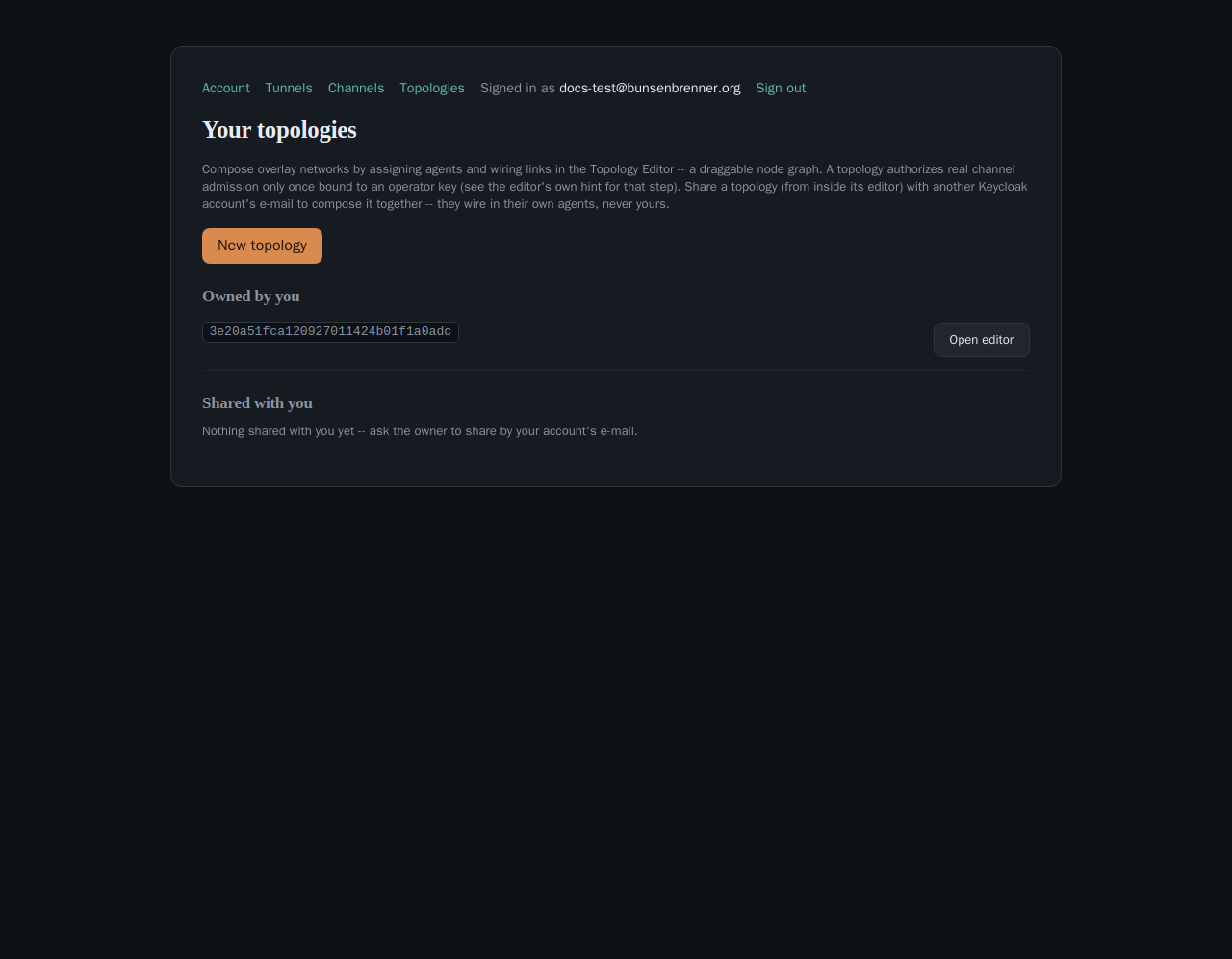
POST /me/topologies call shown above.2. Assign your agents into it
Each agent you want in the topology needs its identity first — the same
ct-agent channel init from Set up an Agent-Fabric channel:
./ct-agent channel init
Paste the printed holder_pubkey into the editor’s “agent id” field in the toolbar and click
Add — a topology node’s id is literally that 32-byte holder key, the same identity
Agent-Fabric channels already use, so there’s no separate node-registration step. Check
super-peer first if this agent should act as a LAN relay for others (see
Run a super-peer) — purely a rendering/
informational hint on the node, it doesn’t change the graph’s admission semantics.
Equivalently: POST /me/topologies/:id/agents {"agent": "<holder-key-hex>", "kind": "peer"}
(kind optional, defaults to "peer"; the other value is "super-peer").
409; the only way back is a
revoke, which returns the agent to its original owner, not free-for-all claimable by
whichever topology reaches for it next.
3. Draw an edge
Click Connect in the toolbar, then click two agent cards on the canvas to wire an
undirected link between them —
POST /me/topologies/:id/edges {"a": "<holder-key-a>", "b": "<holder-key-b>"}. Removing one is
the same shape against DELETE /me/topologies/:id/edges, deliberately 404 whether the edge
doesn’t exist or you can’t edit this topology — a non-owner probing the graph’s shape learns
nothing either way.
At this point you have a real, saved graph — but per the next step, it doesn’t authorize anything live yet.
4. Bind an operator key — the step that makes it real
ct-agent channel bind-topology shipped alongside the fix
as the actual command to produce the proof below (PR#700 + ct-agent#113).
If you don’t already have an operator identity (one per channel/topology-owner, not per agent — see Set up an Agent-Fabric channel’s step 2), generate one once:
./ct-agent channel operator-init
Then, for this topology, sign a proof that you hold that operator key’s private half —
CT_TOPOLOGY_ID is the id from step 1:
CT_CHANNEL_OPERATOR_KEY=<from operator-init> \
CT_TOPOLOGY_ID=<this topology's id> \
./ct-agent channel bind-topology
This prints two hex lines: operator_pubkey (64 hex) and proof (128 hex). Paste them into
the editor’s Bind an operator key panel (below the canvas, visible only to the topology’s
owner, only while unbound) and click Bind.
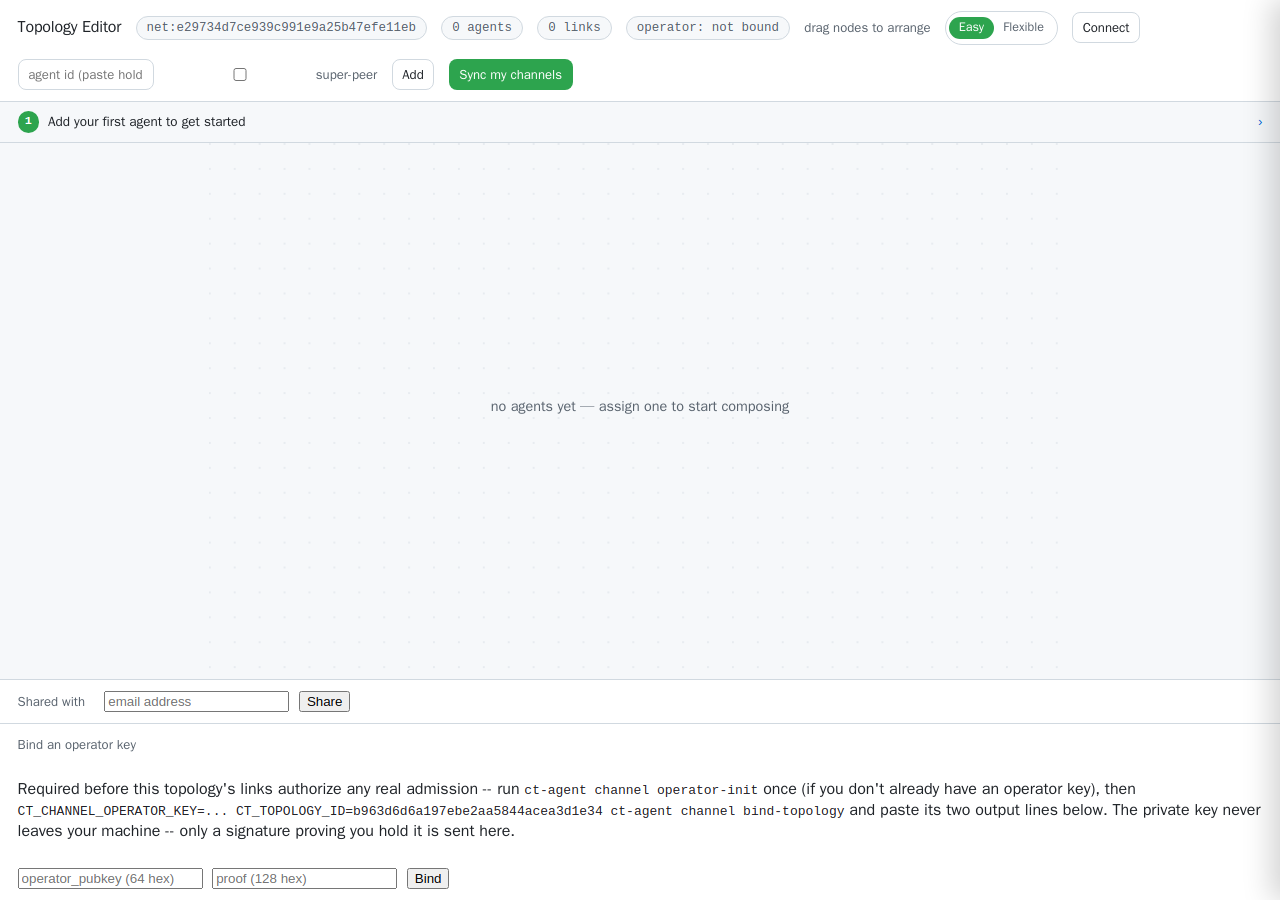
Equivalently:
curl -X PUT https://bunsenbrenner.org/me/topologies/<id>/operator \
  -H "Authorization: Bearer $TOKEN" -H "content-type: application/json" \
  -d '{"operator_pubkey": "<64 hex>", "proof": "<128 hex>"}'
proof is operator_pubkey’s ed25519 signature over
topology_operator_binding_bytes(topology_id, operator_pubkey)
(crates/common/src/channel.rs:838) — proof-of-possession, not just knowledge of a public key,
so binding someone else’s operator key to your own topology (and thereby minting yourself
admission into their real channels) isn’t possible without their private key. A bad proof and
“you don’t own this topology” both come back as the same 404 — deliberately
indistinguishable, so probing a topology id this way learns nothing either way. The private key
itself never leaves the machine that ran bind-topology; only the signature crosses the wire.
Once bound, each declared edge (a, b) additively authorizes the corresponding channel’s
admission for both a and b — the channel id is derived the same way
channel_id_for_link already computes it
elsewhere on this site (authorized_channels/topology_authorizes in
crates/control-plane/src/storage.rs). Remove the edge later and the
authorization goes with it — no separate revocation bookkeeping.
topology-unkeyed) instead of being silently admitted and
then failing to pair. Register the key first via
POST /me/channels/:channel/members
(see [Join a channel](/how-to/join-a-channel/)) — a topology edge alone
now only expresses *intent*, not a working admission path, until the key exists.
5. Confirm it’s live via the public status page
GET /net/<net_uuid> (the net_uuid from step 1, not the topology id) is a public,
unauthenticated page showing the topology’s current agents and edges — a link you can hand to
anyone without granting them any editing access:
curl -s -o /dev/null -w '%{http_code}\n' https://bunsenbrenner.org/net/<net_uuid>
Confirmed live against https://bunsenbrenner.org: an unknown net_uuid returns a real 404
(curl -s -o /dev/null -w '%{http_code}\n' https://bunsenbrenner.org/net/nonexistent-uuid-check
→ 404), not a silent empty page — so a 200 here is a genuine confirmation the topology
exists and is reachable, not just that the route exists.
Optional: overlay mode, sharing, edge-channel notes
None of these change the exclusive-membership or edge-authorization rules above — they extend what the graph or an edge can additionally carry:
- Overlay mode. The toolbar’s
overlaydropdown (Flexible mode only —PUT /me/topologies/:id/mode {"mode": "baseline"|"smart-route"|"shortcut"|"random-mesh"}) switches between direct and three complex-adaptive planning modes, and unlocks Suggest overlay (POST /me/topologies/:id/suggest), a real minimum-latency-spanning-tree planner over caller-supplied link costs. See The Topology Editor for the important caveat: this plans, it doesn’t currently steer live traffic. - Sharing. The editor’s Shared with panel (owner-only) —
POST /me/topologies/:id/share
{"email": "..."}
— lets another Keycloak account view and wire in their own agents/edges, never yours, without owner-only governance (delete, operator-bind, share management). - Attaching a channel id to an edge as a note.
PUT /me/topologies/:id/edges/channel
{"a", "b", "channel"}
(click an edge’s line, “Attached channel id”) is purely informational — it records which real channel an edge represents for anyone reading the graph, but is never consulted byauthorized_channels/topology_authorizes, which always derive the authorized channel from the edge’s two agent ids alone.
Full reference for every endpoint on this page: Topology API.